CLI Usage
Table of Contents
Installation
Using PHAR (recommended)
# Download latest PHAR
curl -LO https://github.com/crealoz/easyaudit-cli/releases/latest/download/easyaudit.phar
chmod +x easyaudit.phar

# Optional: move to PATH
sudo mv easyaudit.phar /usr/local/bin/easyaudit
Using Composer
EasyAudit CLI is published on Packagist under the MIT licence and can be installed as a project dependency:
composer require --dev crealoz/easyaudit-cli
vendor/bin/easyaudit scan /path/to/magento
When installed via Composer, the entry point uses the Composer-generated autoloader (vendor/autoload.php) instead of the hand-rolled PSR-4 loader used by the PHAR build.
Using Docker
docker pull ghcr.io/crealoz/easyaudit:latest
From Source
git clone git@github.com:crealoz/easyaudit-cli.git
cd easyaudit-cli
composer install --no-dev   # optional — enables the Composer autoloader; without it the bundled PSR-4 loader is used
php bin/easyaudit scan /path/to/magento
Commands
Scan
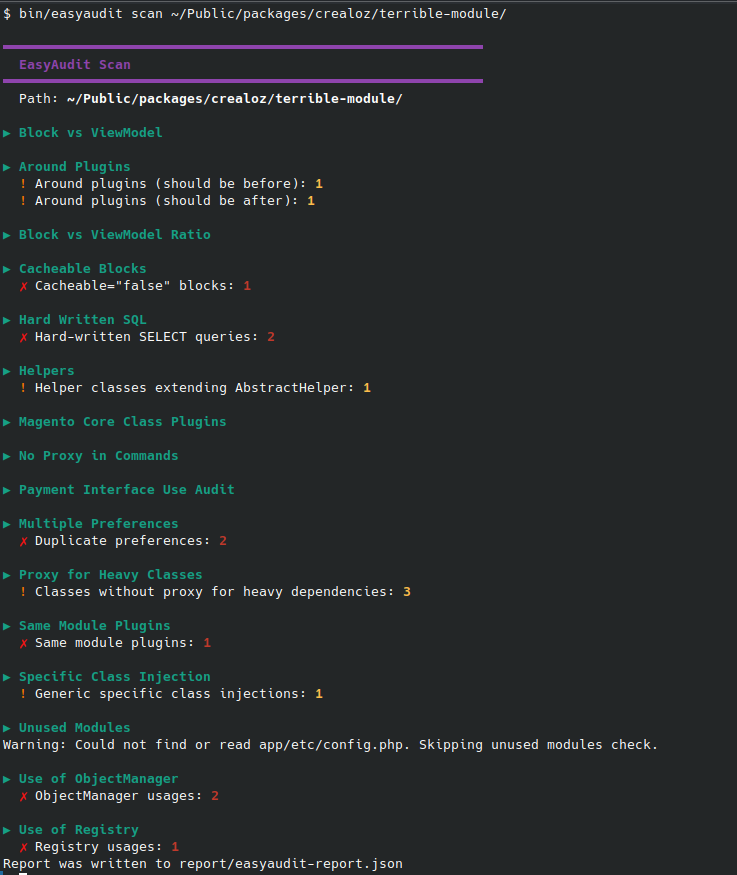
Run static analysis on a Magento codebase.
# Basic scan (JSON output, default)
php bin/easyaudit scan /path/to/magento

# Explicit JSON output
php bin/easyaudit scan /path/to/magento --format=json

# SARIF output (for GitHub Code Scanning)
php bin/easyaudit scan /path/to/magento --format=sarif

# HTML report (visual dashboard, print-to-PDF friendly)
php bin/easyaudit scan /path/to/magento --format=html

# Custom output file
php bin/easyaudit scan /path/to/magento --format=sarif --output=report/scan.sarif

# Exclude directories
php bin/easyaudit scan /path/to/magento --exclude="vendor,generated,var"

# Exclude file extensions
php bin/easyaudit scan /path/to/magento --exclude-ext="js,css"
Options
| Option | Description | Default |
|---|---|---|
--format |
Output format: json, sarif, html |
json |
--output |
Output file path | report/easyaudit-report.(json\|sarif\|html) |
--exclude |
Comma-separated directories to exclude | none |
--exclude-ext |
Comma-separated file extensions to exclude | none |
Help
php bin/easyaudit scan --help
Common Use Cases
Scan app/code only
php bin/easyaudit scan /path/to/magento/app/code --format=json
Scan a single module
php bin/easyaudit scan /path/to/magento/app/code/Vendor/Module --format=json
Scan a Magento root
When pointing at a Magento installation root, noise directories (vendor, generated, var, pub, setup, lib, dev, phpserver, update) are automatically excluded. No --exclude needed.
php bin/easyaudit scan /path/to/magento --format=sarif
Detection is based on Magento indicators (bin/magento, nginx.conf.sample, app/etc/env.php, generated/, pub/). At least 2 must be present.
Quick check before commit
php bin/easyaudit scan . --format=json
Scan and fix workflow
# 1. Scan and generate report
php bin/easyaudit scan /path/to/magento --format=json --output=report.json

# 2. Apply fixes (requires API credits)
php bin/easyaudit fix-apply report.json
Note:
fix-applyrequires API credentials stored in~/.config/easyaudit/. Use the PHAR directly orbin/easyauditfor fix-apply — Docker is not recommended for this command.
Automated PR creation is available as a paid feature. See Automated PR workflow for CI/CD integration.
Docker Usage
Tip: Use
--user "$(id -u):$(id -g)"so report files are owned by your user instead of root.
Basic scan
docker run --rm --user "$(id -u):$(id -g)" -v $PWD:/workspace ghcr.io/crealoz/easyaudit:latest \
  scan /workspace --format=json
Generate SARIF report
docker run --rm --user "$(id -u):$(id -g)" -v $PWD:/workspace ghcr.io/crealoz/easyaudit:latest \
  scan /workspace --format=sarif
Scan a specific subdirectory
docker run --rm --user "$(id -u):$(id -g)" -v $PWD:/workspace ghcr.io/crealoz/easyaudit:latest \
  scan /workspace/app/code --format=json
Exit Codes
| Code | Meaning |
|---|---|
0 |
No errors or warnings found |
1 |
Warnings found |
2 |
Errors found |
Use exit codes in CI to fail builds:
php bin/easyaudit scan /path/to/magento --format=sarif || exit 1
Output Examples
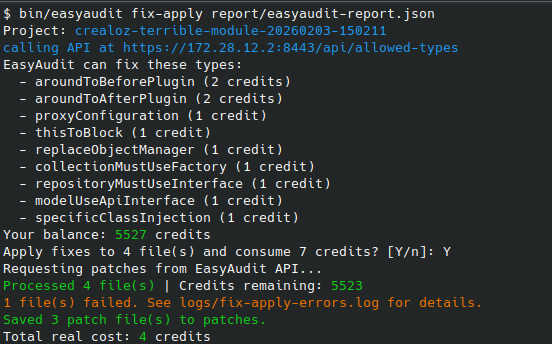
Auto-fix available Many issues can be fixed automatically. Run
easyaudit fix-applyor set up automated PRs
JSON
[
  {
    "ruleId": "sameModulePlugins",
    "message": "Plugin on same module class",
    "files": [
      {
        "file": "app/code/Vendor/Module/Plugin/SomePlugin.php",
        "line": 15
      }
    ]
  }
]
HTML
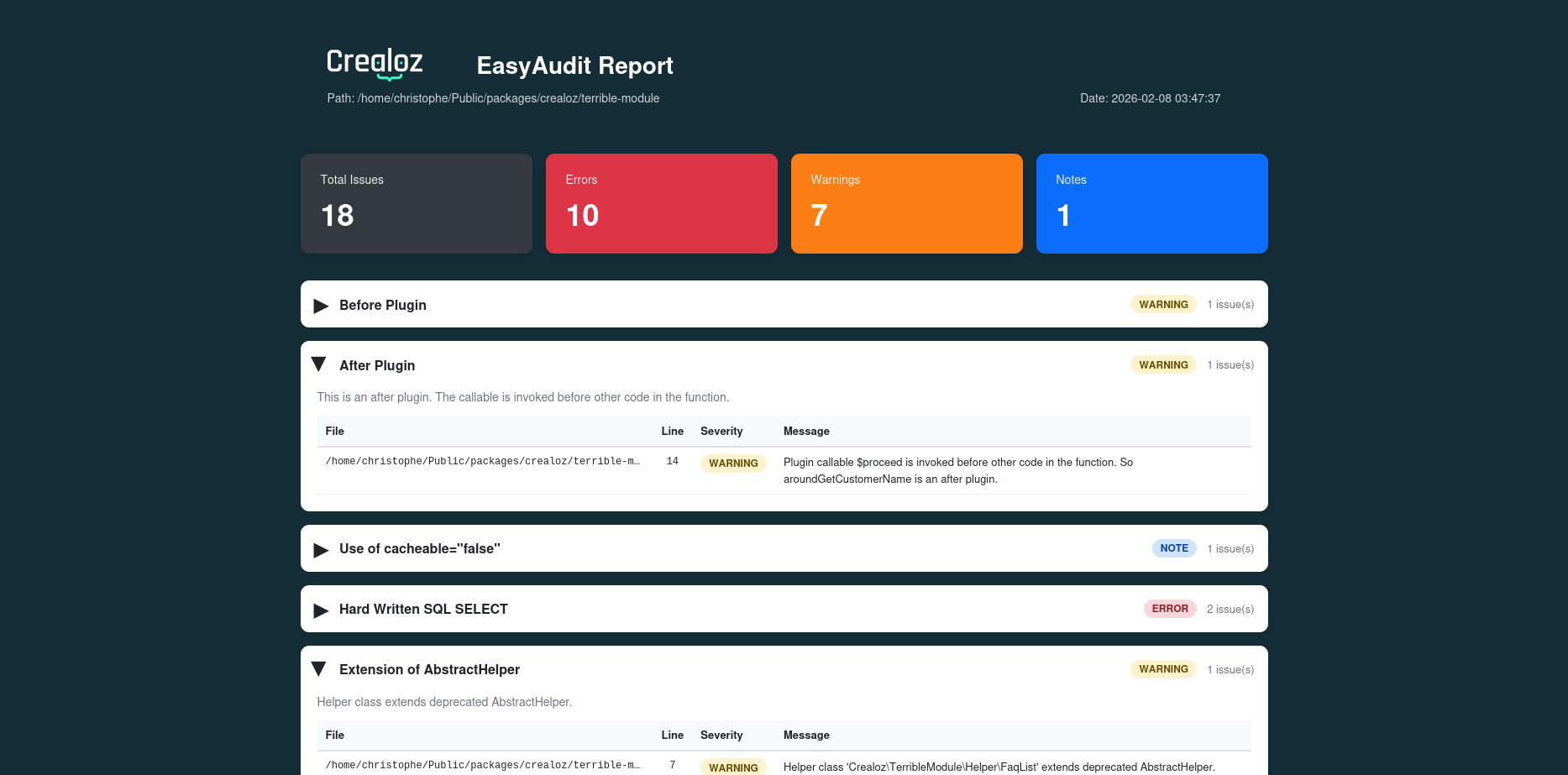
The HTML format produces a self-contained dashboard with:
- Summary cards — color-coded counts for errors, warnings, and notes
- Collapsible rule sections — one per processor, with a table of affected files, line numbers, and messages
- Print-to-PDF support —
@media printstyles ensure clean output when printing from the browser
# Generate HTML report
php bin/easyaudit scan /path/to/magento --format=html

# Open in browser
xdg-open report/easyaudit-report.html    # Linux
open report/easyaudit-report.html         # macOS
The report is fully standalone (all CSS inline, no external dependencies) and can be shared as a single file or printed to PDF directly from the browser.